TMAS’s documentation
Overview
The package uses deep learning to detect M. tuberculosis growth in 96-well microtiter plates and determines Minimum Inhibitory Concentrations (MICs).
Usage
TMAS can be used to detect growth in a 96-well plate and calculate the MIC result of each drug based on the assigned plate design (UKMYC5 or UKMYC6) and plot the results
Installation - Python Package
Install
TMASPyPi package:
$ pip install tmas==1.0.1
Run
TMAS:
$ run_tmas -visualize [folder_path] [output_format]
(Optional) -visualize/–visualize: to illustrate the output image
folder_path: The path to the folder of the raw images
output_format: output MIC of each drug in
csvorjsonfile (default format iscsv)
Installation - GitHub
Clone the repository and navigate to the project directory.
$ git clone https://github.com/Oucru-Innovations/tmas/
$ cd tmas
Install the
TMASpackage using:
$ pip install -e .
Run
TMAS:
$ run_tmas -visualize [folder_path] [output_format]
(Optional) -visualize/–visualize: to illustrate the output image
folder_path: The path to the folder of the raw images
output_format: output MIC of each drug in
csvorjsonfile (default format iscsv)
If encounting any error in Installing the packages, please refer to the Debugging section.
Tutorial (to be updated when the examples are uploaded)
Explore the examples folder
$ cd data
$ ls
1/ 2/ 3/ 4/ 5/
In each examples folder, there is the raw image with the exact same name with the folder
$ ls 1/
01-DR0013-DR0013-1-14-UKMYC6-raw.png
To process and analyse a single image using the default settings is simply
Choose your desired MIC output file:
json: with only 1 image
$ run_tmas data/1/01-DR0013-DR0013-1-14-UKMYC6-raw.png json
json: with a whole folder
$ run_tmas data/1 json
or
csv: with only 1 image
$ tmas_run 01-DR0013-DR0013-1-14-UKMYC6-raw.png csv
csv: with a whole folder
$ run_tmas data/1 csv
Growth detection output:
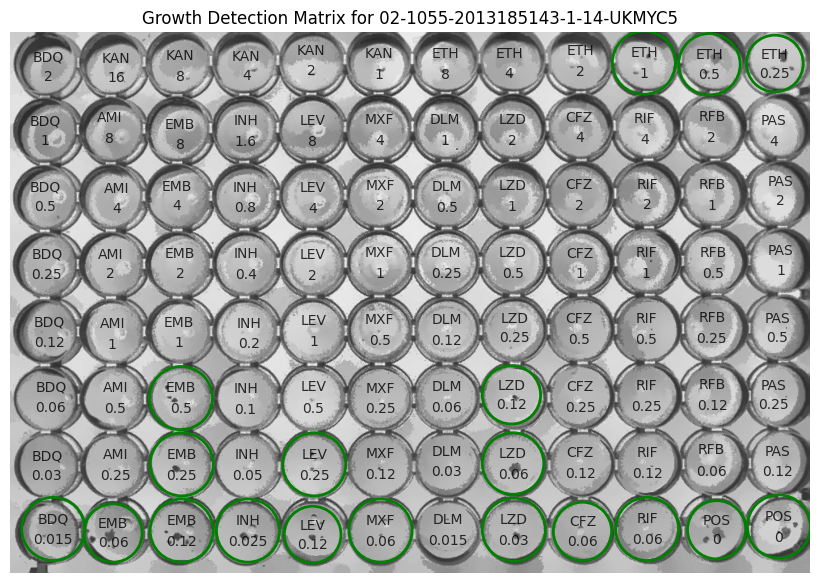
4. Output files:
After TMAS has done running, the growth detection and MIC results will be displayed in your terminal.
Not only that, the growth detection image and the MIC results file with the chosen format will be saved in the same folder with the input image.
$ ls -a 1/
output/ 01-DR0013-DR0013-1-14-UKMYC6-raw.png
$ ls -a 1/output/
01-DR0013-DR0013-1-14-UKMYC6-growth-matrix.png
01-DR0013-DR0013-1-14-UKMYC6-mics.csv
01-DR0013-DR0013-1-14-UKMYC6-mics.json
01-DR0013-DR0013-1-14-UKMYC6-filtered.png
01-DR0013-DR0013-1-14-UKMYC6-raw.pngis the original image.01-DR0013-DR0013-1-14-UKMYC6-filered.pngis the filtered image after preprocessing.01-DR0013-DR0013-1-14-UKMYC6-growth-matrix.pngis the image with the growth detection plotted.01-DR0013-DR0013-1-14-UKMYC6-mics.csvcontains the information, including filename, drug name, growth detection results, MIC result.01-DR0013-DR0013-1-14-UKMYC6-mics.jsoncontains the same information as thecsvfile but in a different format per requested.